 MDI Companion
mdi-ml-classifier
The book’s closing application: an end-to-end image-classification tool combining the MDI desktop framework, Swing, sPlot, and ONNX Runtime.
github.com/heddle/mdi-ml-classifier · v1.0.1 release
What It Demonstrates
This is intentionally the most application-focused example in the book — it shows what an application built on MDI looks like once the individual pieces are no longer introduced one at a time:
- Loading and swapping external ONNX models at runtime, without restarting the application
- Background inference with proper cancellation of stale work when a new image or model supersedes an in-flight request
- Configurable input preprocessing and per-model normalization settings
- Configurable top-K results, comparison history, and clipboard or CSV export
- A recent-images and recent-models list, each model retaining its own labels path and normalization
- Recovery from invalid startup conditions — a missing model at launch doesn’t prevent the application from starting; it opens a model chooser instead
Gallery
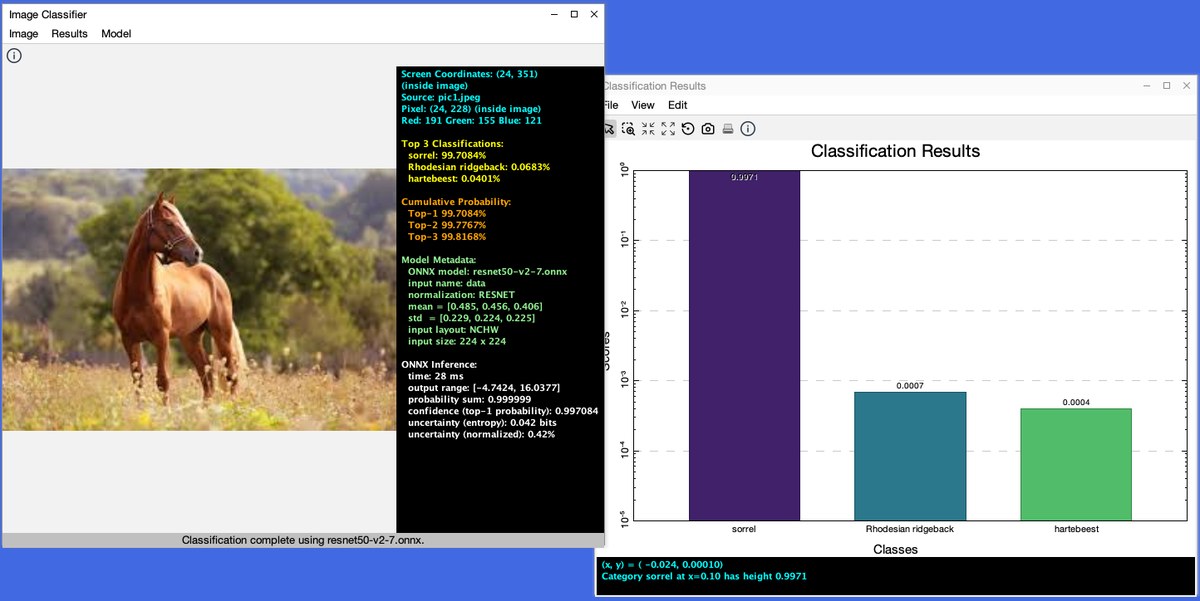
PlotView bar chart of the scores rendered with sPlot on a log scale.Requirements
- Java 17 or newer
- MDI 1.2.3, resolved automatically from Maven Central
- An ONNX image-classification model (not bundled — see below)
Try It
The default model location is models/mobilenetv2-12.onnx; the ImageNet label
file is already included at models/imagenet_labels.txt. Large model binaries are
not committed to the repository — obtain MobileNet V2 from the ONNX Model Zoo, or supply
another compatible single-input, single-output RGB classifier.
git clone https://github.com/heddle/mdi-ml-classifier.git
cd mdi-ml-classifier
mvn clean package
mvn exec:java \
  -Dexec.mainClass=edu.cnu.mdi.mlclassifier.app.ClassifierApp \
  -Dexec.args="--model=/path/to/model.onnx --labels=/path/to/labels.txt"
Open an image by dropping it onto the classifier view, or via Image > Open Image…. Use Model > Open ONNX Model… to load or replace the classifier without restarting.